Meet new features, tools and improvements packed in VSDC 11.2! Smart File Search, GPS‑Video Sync, H.266 (VVC), Shape Keyframes, Templates and Performance Boosts
SOFIA, BULGARIA, July 2, 2026 /EINPresswire.com/ — Version 11.2 of the free VSDC video editor is officially out!
Remember hunting for lost files in your projects? Struggling to sync GPS data with action cam footage? The VSDC team has fixed both in version 11.2 and gone further with H.266 (VVC) support, Vulkan acceleration for 4K/8K proxies, shape keyframes, new templates and more!
Here’s a closer look at everything new in VSDC 11.2.
Smart Search for Lost Files
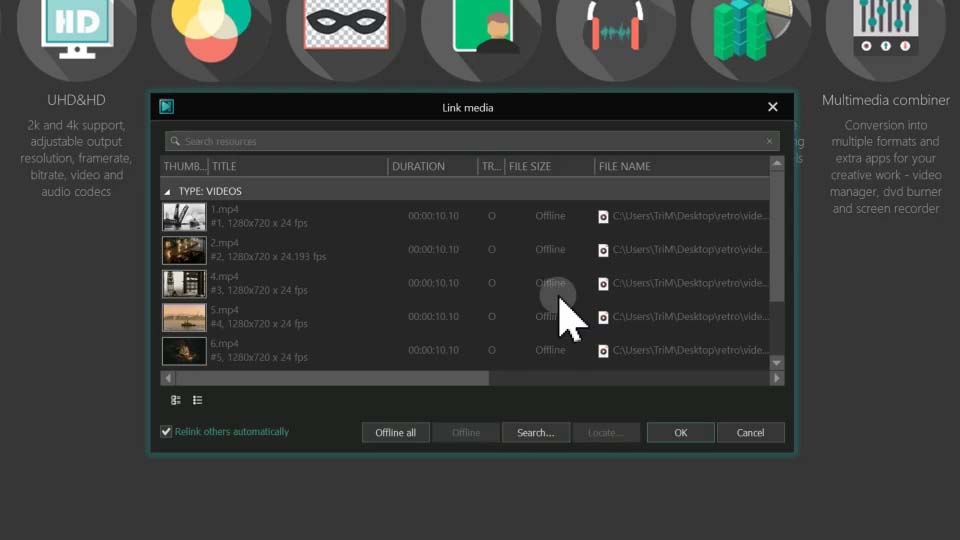
Moving project folders or renaming source files used to mean dealing with error messages and manually relinking each lost file in the Properties window. With version 11.2, the VSDC team has put an end to that by introducing a smart system for handling lost media.
Now, when you open a project with missing files, VSDC instantly alerts you and brings up a file search window. You can still point to a single file manually if you prefer, but here’s the real breakthrough: you can also select a new directory for just one file and let the algorithm scan the full directory automatically. In one operation, it will locate every missing file stored in that folder.
If you’d prefer to locate some files later, you can simply close the window and return to the search the next time you open the project.
GPS Data and Video Synchronization
If you’re using a GoPro or Insta360, video and telemetry are usually already linked. But if you’re working with any other device, there’s no built-in connection between the footage and the data and creating one can be tricky.
VSDC 11.2 changes that with a new feature: telemetry markers. They allow you to establish the link between video and GPS data with pinpoint accuracy.
Here’s how it works: you add your video and GPX file to the scene, then place a telemetry marker on the video to mark a precise moment — say, a turn, a jump, or any other noticeable action. Next, you do the same on the telemetry data, placing a matching marker at the corresponding point. Finally, simply select the target video in the telemetry object’s properties and sync them.
H.266 (VVC) and Vulkan Acceleration
VSDC is one of the first video editors to introduce support for the H.266 (VVC) codec, which is now available in the export profile settings. This compression standard delivers the same quality as H.265 while taking up 30–50% less storage space and up to 70% less than H.264 while maintaining the same visual quality.
To streamline your workflow, the team has also added Vulkan acceleration, so your GPU can now generate lightweight proxy copies much faster, even for 4K footage and beyond. To activate it, simply head to the program Options, find the proxy section and select this decoder type for proxy creation.
Fresh Designer Templates and Shape Animation
The VSDC Store has been updated with five new premium template collections. Action sports editors will appreciate the new three GPS telemetry packs SegMentor Dash, Dynamic Hues, and AeroSense Dash while creators looking for a retro look can grab the Grain Texture and Vintage Reel packs.
Additionally, the update brings keyframe support to basic shapes (Rectangles, Lines, Ellipses) and introduces three-color gradients.
Color Workflow and Performance Boosts
Working with color is one of the core tasks in video editing, and with VSDC 11.2, it’s now more convenient and faster than ever!
The team has added hotkeys for controlling LGG (Lift/Gamma/Gain), so you can now adjust shadows, midtones and highlights without ever taking your hands off the keyboard. This is especially valuable for those who prefer working with external controllers, since you can map these hotkeys to your controller and adjust everything right from it.
What’s more, the key assignments are compatible with all VSDC keyboard layouts (Adobe Premiere, Filmora, HitFilm, etc.) so the update ensures a smoother and more intuitive transition to VSDC from other video editors.
Full details on version 11.2 are available in the press release posted on the official VSDC website.
Availability
VSDC 11.2 is available as a free download for Windows, supporting both 32-bit and 64-bit systems. For users who need advanced features like hardware acceleration, motion tracking, AI-powered tools, video stabilization, etc., VSDC Pro is also available.
The premium templates mentioned in this release are available for purchase in the VSDC Store catalog.
For more details, a full list of fixes and system requirements, visit the official VSDC website and if you have any questions, contact VSDC team at support@videosoftdev.com.
ANVAR KURBANALIEV
FLASH-INTEGRO LLC
email us here
🔥VSDC 11.2: Full Overview of All New Features
Legal Disclaimer:
EIN Presswire provides this news content “as is” without warranty of any kind. We do not accept any responsibility or liability
for the accuracy, content, images, videos, licenses, completeness, legality, or reliability of the information contained in this
article. If you have any complaints or copyright issues related to this article, kindly contact the author above.

Media gallery